

Mobile App - Cartography
Making Movement Visible
Overview
The distance pill is a small floating element on the live tracking screen that shows the real-time distance between a driver and the passenger's pickup location. It sounds simple, just a number on a map. But when passengers are waiting for their ride, this tiny element becomes the difference between patience and cancellation.
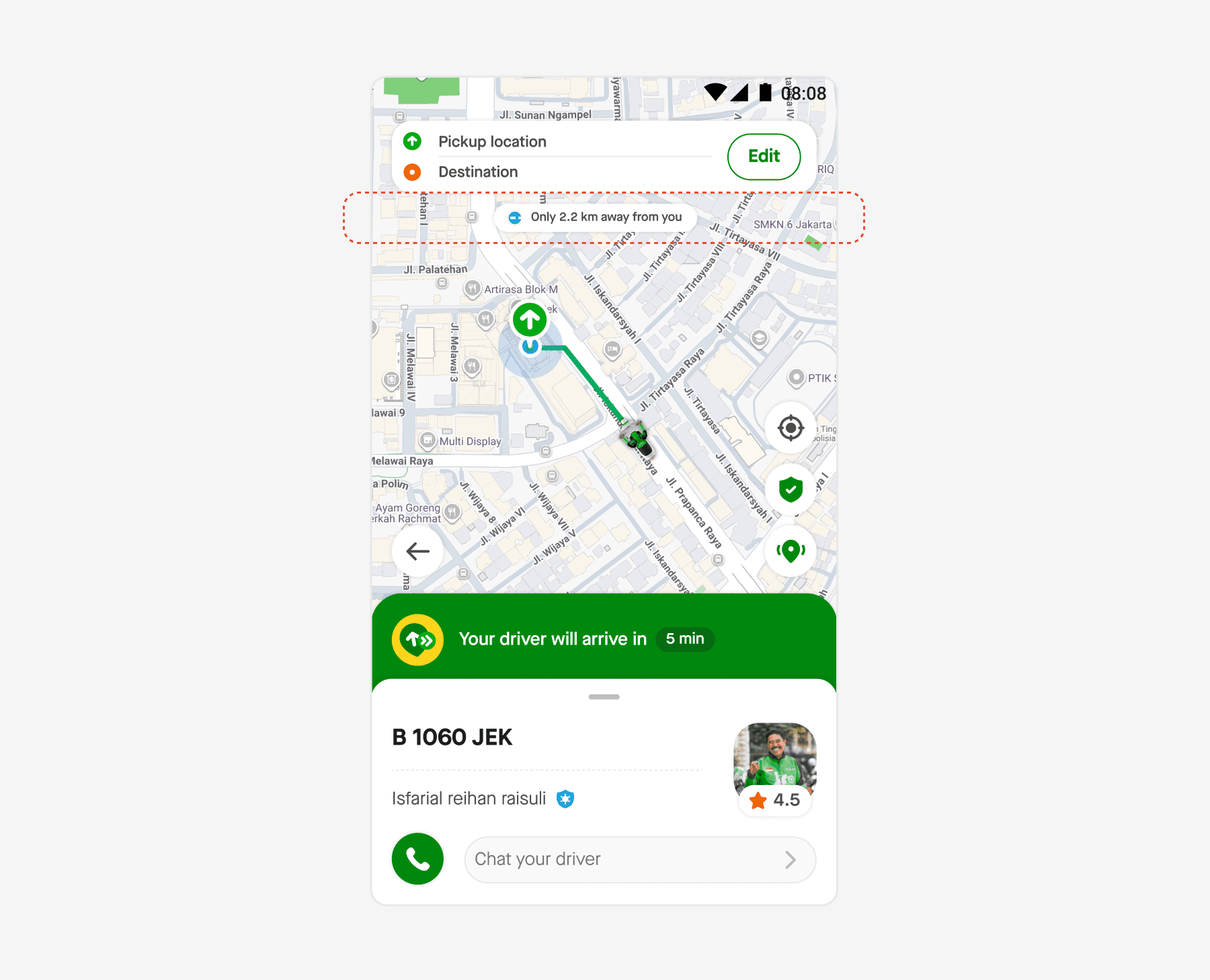
At the time of this project, the pill's behavior was unreliable. It appeared inconsistently, showed confusing values, and sometimes vanished entirely. Passengers had no clear signal that their driver was actually moving toward them, and the business data showed the consequences.
The Problem
Our team identified that CADF (Cancellation After Driver Found) was disproportionately high for one specific reason: "driver not moving."
But in most of these cases, the driver was moving. The problem wasn't the driver — it was the interface. Passengers simply couldn't see movement happening.
The existing distance pill had four critical issues:
- It only appeared when the driver was less than 2 km away, meaning passengers had zero distance visibility for most of the journey.
- Once shown, it stayed persistent even when the distance later exceeded 2 km, creating stale, misleading information.
- Distance values were displayed as raw, unrounded numbers, hard to read at a glance.
- The pill disappeared entirely when driver location data was temporarily unavailable, reinforcing the perception that the driver had stopped.
To make things worse, the three key pieces of information: Driver location, ETA, and Distance — were shown as separate, fragmented elements. Passengers had to mentally connect the dots themselves.
The Hypothesis
We believed that if we showed the distance pill consistently throughout the entire journey, passengers would perceive driver movement more accurately, and cancel less.
The logic was straightforward: a decreasing distance number is a clear, real-time signal that the driver is getting closer. Even in heavy traffic where ETA might read "8 minutes," seeing the distance drop from "1.2 km" to "400 m" gives passengers tangible reassurance that progress is being made.
Scope & Approach
The scope of this project was focused on improving the distance information visibility on the live tracking screen. We defined three key areas:
- Always-on visibility, Remove the 2 km threshold and show the distance pill from allocation to arrival.
- Distance display logic, Implement smart rounding and progressive content that adapts based on distance ranges, prioritizing how humans perceive numbers over raw data accuracy.
- Pill placement, Redesign where and how the pill appears on the map so it feels contextual to the driver's movement.
Working timeline:
- Hi-Fi Design, Early of October 2025 - Mid of November 2025
- Development, Mid of November 2025 - End of December 2025
- Release, Early January 2026
Benchmark
Before exploring solutions, I studied how other ride-hailing platforms surface distance information during the driver-on-the-way state. I wanted to understand two things: what information they prioritize, and where they place it.
I looked at four direct competitors:
Each platform took a different approach:
- Grab shows the driver status (distance and estimated arrival) prominently on the card's first fold, and changes the copy to "Driver is nearby" as the distance closes in.
- Uber displays distance floating next to the driver icon on the map, with the ETA shown separately — the distance is anchored isometrically to the vehicle.
- Namma Yatri takes a similar floating approach, showing distance directly on the driver icon.
- GreenSM doesn't show distance at all. Instead, it displays the estimated time twice — once near the pickup location and once on the card's first fold.
From this analysis, two common placement patterns emerged:
The first is placing distance information on the card's first fold. The advantage is that there's more space for detailed information. The drawback is that our card already carries a lot of information and the space is shared with other stakeholders.
The second is floating the information next to the driver icon on the map. This approach is more contextual — the distance label sits right next to the moving object it describes. The trade-off is that we need to carefully configure the interaction so the map doesn't feel cluttered.
I leaned toward the floating approach. It creates a direct visual connection between the distance value and the driver's position, which reinforces the perception of movement. But this raised an important question:
How might we configure the interaction so the map doesn't look too complicated?
This question became the starting point for the exploration phase.
Exploration
With the floating pill direction established, I needed to answer several design questions in parallel. What information goes on the pill versus the banner? Where exactly should the pill sit on the map? What should it look like? And how should it behave when things go wrong?
What information belongs on the pill?
The first question was about information hierarchy. The live tracking screen already has a banner at the bottom showing driver details. With the pill floating on the map, I had to decide how to split information between these two surfaces.
I explored three alternatives:
Alt 1: Distance on the pill, ETA on the banner. The pill shows the real-time distance (e.g., "500 m") while the banner continues to display ETA. This gives immediate clarity of physical distance, the pill represents the actual space between driver and passenger.
Alt 2: ETA on the pill, Distance on the banner. Flipping the hierarchy, putting the time estimate on the floating element instead. While this gives immediate ETA clarity, it felt irregular. The pill is anchored to a moving object on a map, so shifting from physical distance to temporal estimation breaks the spatial metaphor. There was also a practical concern: the banner is shared with other stakeholders, and changing its content would require significant cross-team coordination.
Alt 3: Both time and distance on the pill. Showing everything in one place sounds efficient, but the pill has limited space. Cramming two separate data points into a small floating element increases cognitive load, and creates redundancy with the banner.
Alt 1 is preferred. Distance is a real value that directly represents the physical movement of the driver. It maps naturally to a floating element anchored to the moving icon on the map. ETA, on the other hand, is a processed estimate influenced by traffic, speed, and routing, it belongs on the banner where there's room for context.
Where should the pill sit?
For map-level placement, I considered three approaches:
Static placement positions the pill in a fixed location relative to the driver icon, always above, always below, always left, or always right. It's easy to implement, but it can't adapt to the map dynamically. For example, when the driver is already near the pickup location, the pill might overlap with the pin.
Vertically dynamic placement flips the pill's position based on the driver's location relative to the pickup point. If the driver is below the pickup on the map, the pill appears above the icon to avoid overlapping with the pickup pin, and vice versa. This keeps the pill visible without colliding with other elements on the screen.
Horizontally dynamic placement works on the horizontal axis, the pill appears on the left or right side depending on the driver's position. This introduced a potential overlap with the pickup direction pill, which needed separate consideration.
I also explored a more ambitious alternative: anchoring the pill to the vehicle icon based on its heading direction. Since the driver icon rotates as it moves along the route, the pill could reposition itself based on the vehicle's compass heading, sitting below when facing upward (285°–75°), above when facing downward (115°–285°), and shifting left or right when the vehicle turns sideways. This would keep the pill perfectly clear of the vehicle graphic at every angle.
For this release, we aligned on static placement above the driver icon, a pragmatic decision driven by technical constraints.
To make static placement work cleanly, we addressed the two main risks up front. For overlap with other UI elements, we defined a clear layering hierarchy so the distance pill never visually clashes with the pickup pin, direction pill, or map controls. And for the edge case where the driver is very close to the pickup point (where a static pill would collide with the pin) the map automatically zooms in and reframes to fit only the components that matter at that moment.
With these two safeguards in place, static-at-top covered the majority of use cases while keeping implementation scope manageable for the release timeline.
How should it look?
For the pill's visual style, I explored five variations, each applied to the same map context to compare how they sit alongside the driver icon and existing UI elements.
- Style 1 uses a minimal, label-like treatment, plain text near the driver icon with no background fill, almost like a native map annotation.
- Style 2 goes the opposite direction with a dark filled pill and white text, making it highly visible but potentially competing with the map.
- Style 3 uses a green/teal fill that matches the app's brand color, which draws attention but risks blending with the existing green banner below.
- Style 4 takes a neutral approach with a light outlined pill, readable but understated.
- Style 5 uses an amber/orange fill, which creates strong contrast against the map but introduces a color not present elsewhere in the screen.
I chose Style 1. The map already has a lot happening, route lines, pin icons, the green ETA banner, driver photo. Adding another prominently colored element would only add noise. Style 1 sits quietly next to the driver icon, readable when you look for it but never fighting for attention. The pill should feel like a natural extension of the map, not a new UI element layered on top.
What copy fits in a compact pill?
The pill needs to stay small, compact enough to sit alongside the driver icon without cluttering the map. We defined a tight size constraint based on what looks clean and proportional against the map elements, which meant the copy had to work hard within limited space.
I mapped out how different copy formats scale across distance ranges, from nearby (<1 km) to far (>5 km), in both Bahasa and English.
The exploration covered four tiers of verbosity:
- Descriptive with flexible width (e.g., "Just 500 m away") most informative but the pill grows too large and starts competing with the map.
- Descriptive with a fixed width cap, a good balance of context and size, but still slightly larger than what felt clean.
- Concise with flexible width (e.g., "500 m away") shorter, though still requires the pill to stretch for some distance ranges.
- Concise with a fixed compact size (e.g., "500 m away") fits within the tightest constraint with progressive content that adapts per distance range.
We went with the last option. It keeps the pill visually compact at every distance range, delivers clear information at a glance, and avoids the need for dynamic resizing, which would have introduced additional engineering complexity and visual inconsistency as the pill shifts size during the journey.
What happens when the driver location is missing?
This was an important edge case. When the system temporarily loses the driver's GPS signal, the current implementation removes the route line from the map and makes the driver icon blink on and off. A green banner appears to inform the user that the position is being updated.
The problem with this approach is that it feels alarming. The driver icon disappearing creates anxiety, exactly the kind of experience that leads to cancellation.
I proposed keeping the driver icon visible at its last known location, adding a pulse animation effect, and changing the pill copy to "Updating..." instead of hiding it. This maintains a positive, reassuring tone: the system is actively working to reconnect, not failing silently.
The banner messaging was also refined to frame the situation constructively: "We're updating the driver's position" emphasizing action rather than error.
Final Design
The final specification covered every state the pill would encounter in production, from the moment a driver is allocated to the moment they arrive at the pickup point.
In the complete state, the pill displays distance with progressive content that adapts to how far the driver is. At longer distances, it shows a rounded kilometer value. As the driver gets closer, it transitions to a more specific range. Under 1 km, it switches to meters with rounding logic tuned for readability. And when the distance drops below 150 meters, the map reframes to a close-up view, signaling arrival.
Post-Launch Experiment
After the feature launched, we ran a follow-up experiment to answer a question we couldn't answer through design alone: when the driver is actually far away, what number should the pill display?
The pill is always visible, but we tested different caps on how the copy behaves at long distances. In one variant, the pill capped at "2+ km away" so even if the driver was actually 7 km away, the passenger would see "2+ km." In another variant, it capped at "5+ km away." We also tested showing the raw distance with no cap at all.
The 2+ km variant performed the best.
Our hypothesis for why is that the number itself shapes the passenger's emotion. "2+ km" feels within reach, it reads as "the driver is getting close enough to wait for." But "5 km away" or "7 km away" doesn't feel like progress, it feels like confirmation of how far the driver still is. The higher the number, the more anxiety it introduces, which is the opposite of the reassurance we were trying to deliver.
The cancellation reduction wasn't dramatic in raw numbers. But something more important emerged: the distance pill became a foundation for how passengers make the decision to wait. Before, passengers had only ETA, a processed estimate that gives no sense of physical progress. After, they had a tangible signal of movement that helped them calibrate their own patience.
It reframed what this feature actually does. The pill isn't just an information element, it's a decision-support element. It gives passengers something concrete to anchor their judgment to, especially when traffic or delays make ETA feel unreliable.
Reflection
Designing the distance pill looked small on paper. In practice, it surfaced three principles about working at the intersection of data, perception, and emotion, principles that now shape how I approach every interface decision.
The distance pill occupies only a sliver of the live tracking screen. But it sits at the exact moment where passenger anxiety peaks, which means a small design decision here ripples into measurable cancellation behavior at scale.
A meter-by-meter distance counter is more precise than a five-meter one, and completely unreadable. Perception beats precision when humans are the ones reading the screen, especially under the stress of waiting.


