
On Demand Service - Mobile App
Extend Booking Mid-Service
My Role
Product Designer
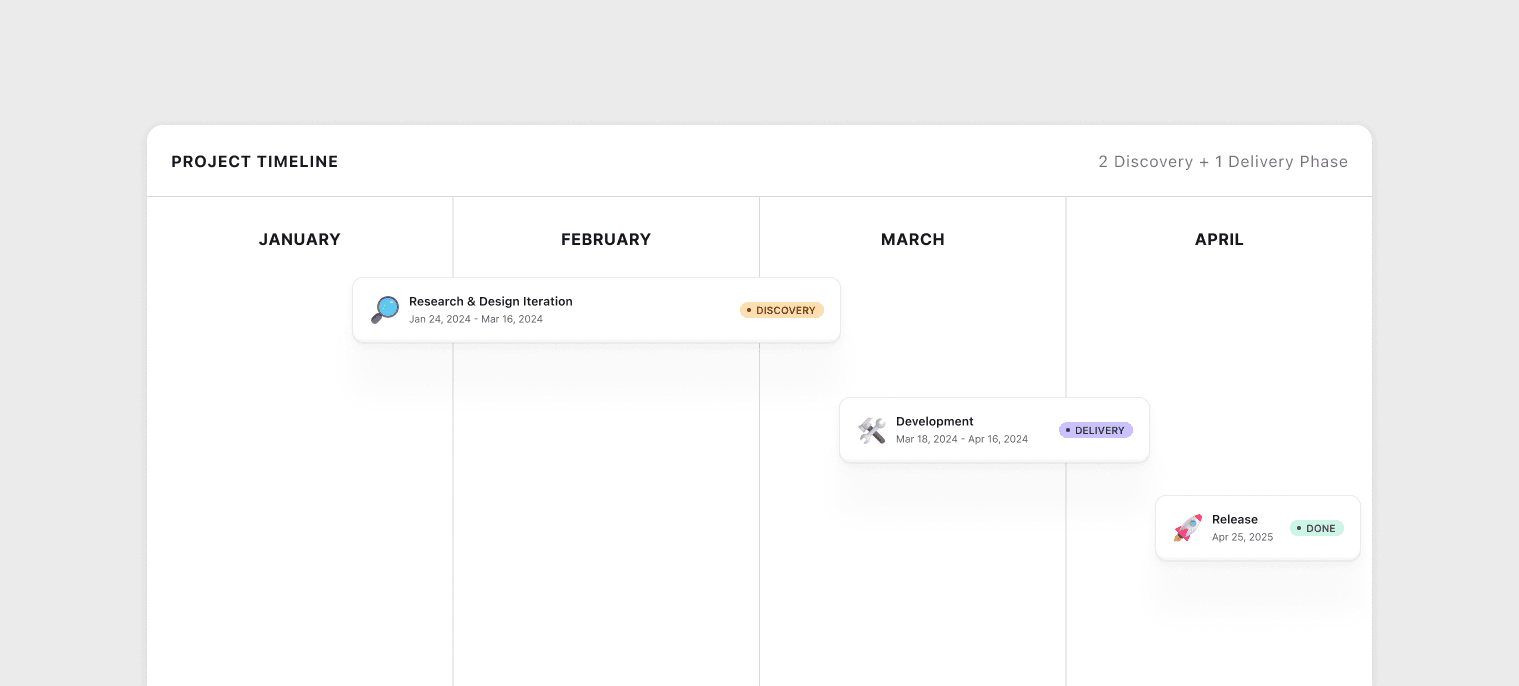
I owned the end-to-end design process for this project, from initial discovery through final concept delivery. This included collaborating with a Product Researcher to plan and conduct user research, and working closely with the Engineering Manager to define technical feasibility and scope constraints.
Feature Scope & Future Potential
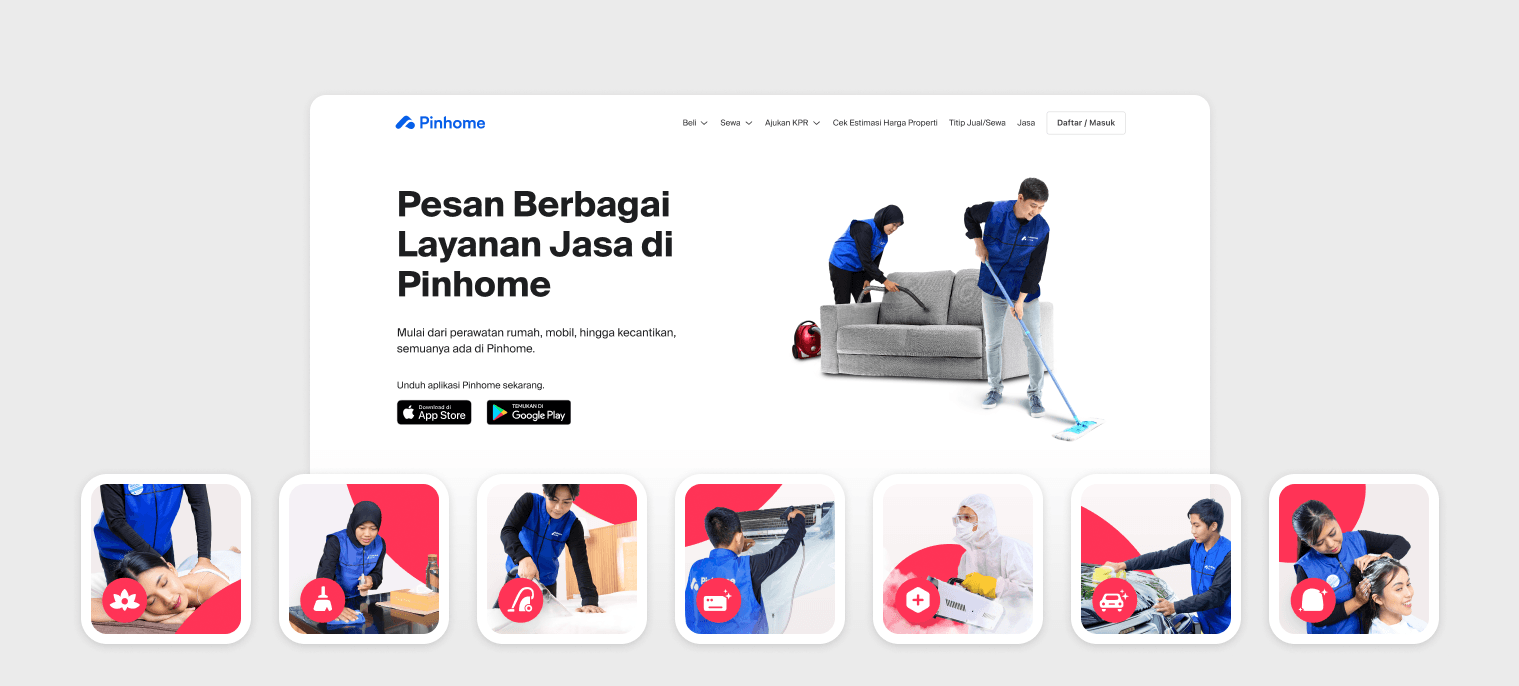
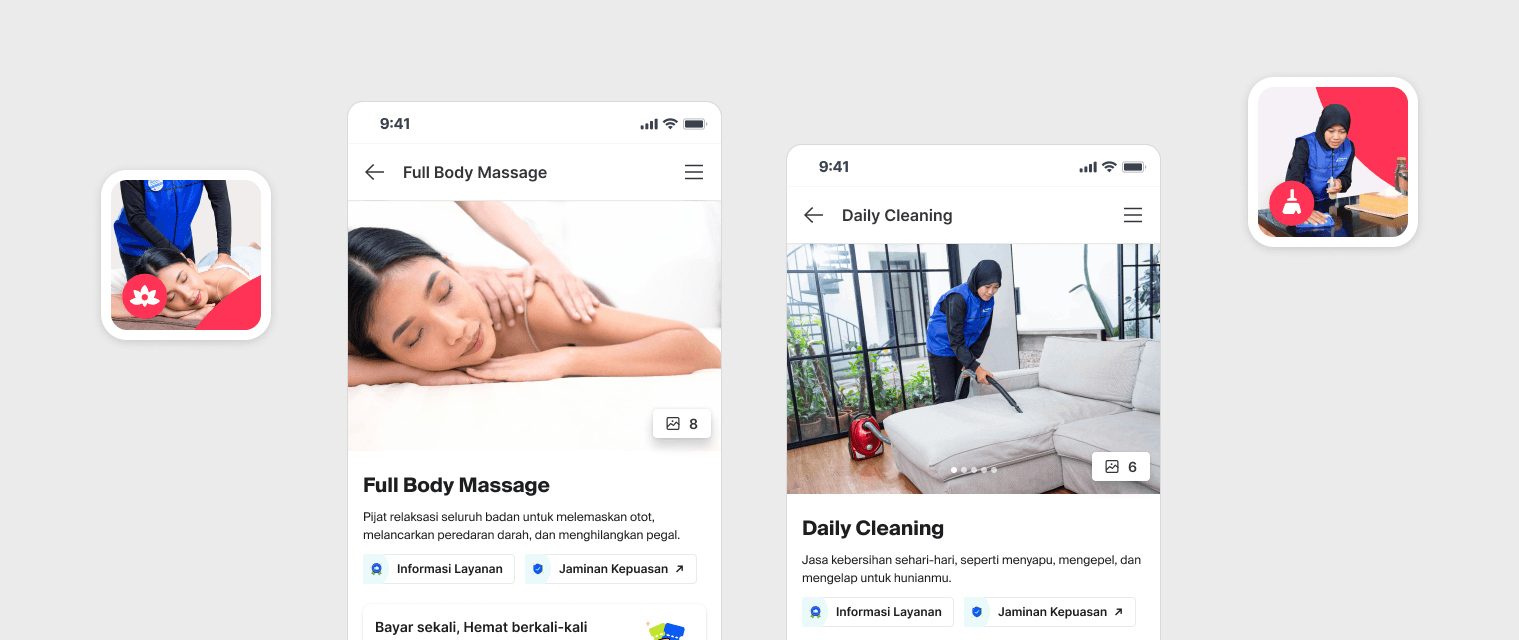
Targeted Services: Massage & Home Cleaning
This feature allows users to extend their service duration while an order is still in progress. It launched for Pinhome's two highest-demand services: Massage and Home Cleaning. The underlying flow was designed as a quotation-based system, intentionally built to be scalable, enabling future adoption across other service categories.
The Problem
Why We Built This Feature?
Imagine you're midway through a massage session and realize you want an extra 30 minutes. There's no option in the app, so you negotiate directly with the service partner, paying in cash, off-platform. No receipt, no accountability, and no insurance coverage if anything goes wrong.
This was a recurring scenario, and it created problems on multiple levels:
User Insight: Users frequently wanted to extend their bookings mid-service, but had no in-app mechanism to do so — forcing them into informal, off-platform arrangements.
Business Concern: These untracked, cash-based extensions meant lost revenue for the platform and zero visibility into actual service demand and duration patterns.
Experience Gap: Without an official extension flow, disputes and complaints were common — and since the extended service wasn't formally booked, users lost insurance protection during the added time.
Challenges & Success Criteria
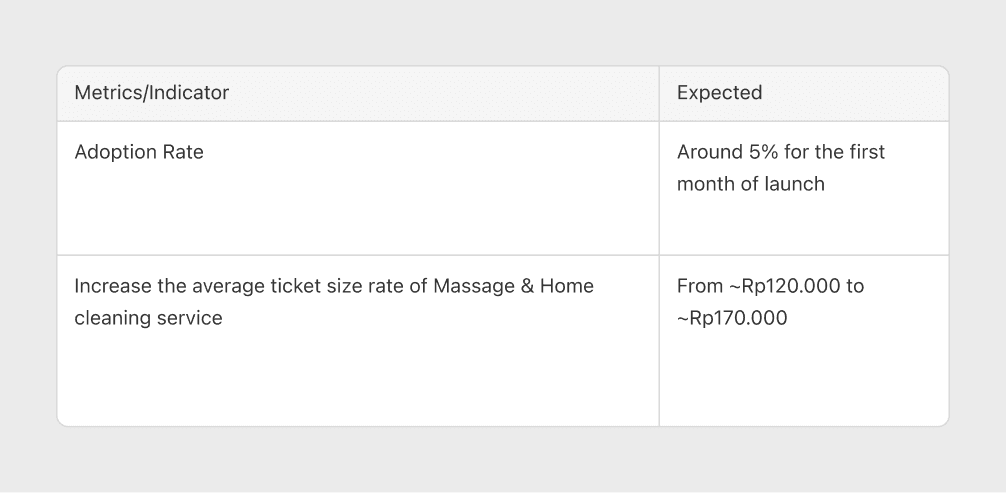
This project started from a blank slate, no existing feature, no prior flow to iterate on. We needed to design an entirely new interaction within an active order state, which introduced unique constraints: the user is occupied (receiving a service), the service partner's availability is dynamic, and the system needs to handle real-time scheduling validation.
Research Approach
1. Concept Testing (Before Designing)
Focus: Validate early assumptions and understand how users mentally model the idea of extending a booking mid-service.
Methods: We conducted informal discussions with 5 targeted users from the Massage and Home Cleaning segments. Using rough sketches (no prototype), we gathered initial reactions to different conceptual approaches.
Key takeaway: Users consistently expressed a preference for a flow that "looks like the original booking form" — reasoning that familiarity would make it easier to use. This feedback became a pivotal input for our first design iteration.
2. Usability Testing (After First Design Draft)
Focus: Evaluate whether the first iteration (designed around the concept testing feedback) was actually clear and usable in practice.
Methods: Remote moderated usability testing combining qualitative observation (user behavior, think-aloud commentary) and quantitative measurement (task completion rate, error rate, time-on-task).
Design Proposal
First Iteration: When User Feedback Misleads
The earliest design direction came from Concept Testing, where users told us what they thought they wanted:
"Just make it look like the original booking form, so it's easier."
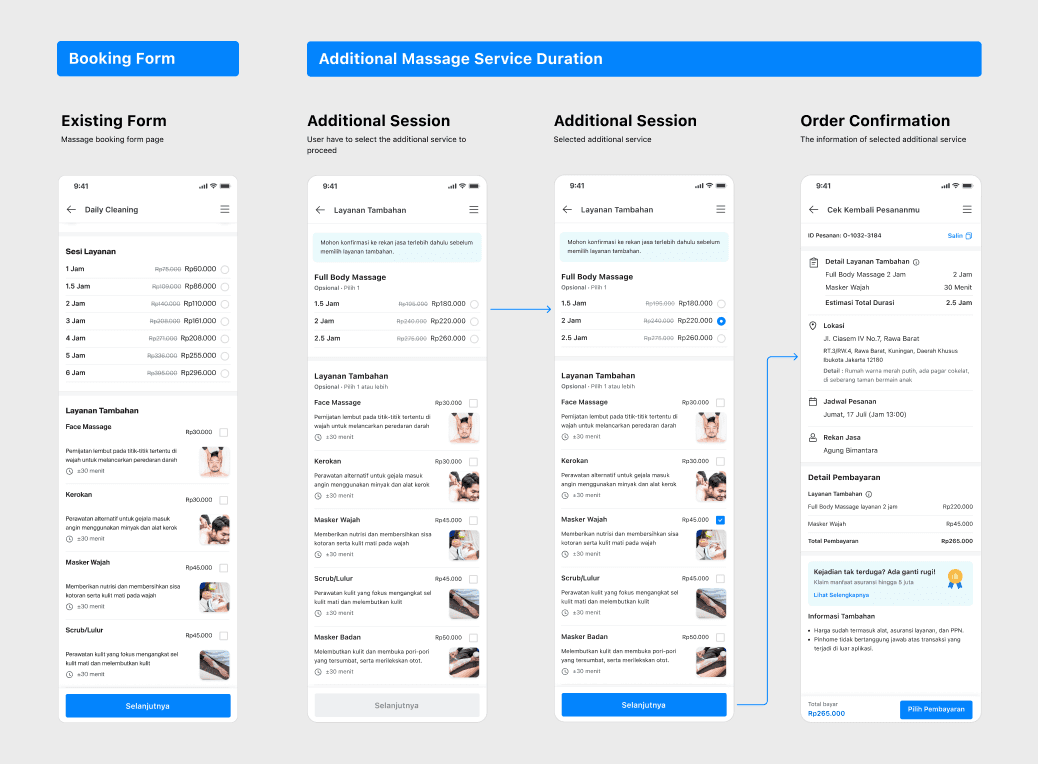
We took this feedback at face value and designed a UI that closely mirrored the original booking flow. The logic seemed sound: if users are already familiar with the booking form, replicating it for the extension flow should minimize the learning curve.
We then put this design through Usability Testing, and the results told a very different story.
What Went Wrong
The visual similarity between the extension flow and the original booking flow caused serious confusion during testing:
- Users didn't realize they were using a new feature. Several participants thought they had accidentally navigated back to the booking screen and tried to place a new order instead of extending their current one.
- The context was fundamentally different. When placing an original booking, users are browsing and deciding. When extending mid-service, they're in a time-pressured, mid-experience state. The same visual language carried entirely different expectations.
- Core lesson: Familiarity ≠ Clarity. What users said they wanted (a familiar-looking form) and what actually helped them (a clearly differentiated flow) were two different things. The concept testing validated the need, but the usability testing revealed that the execution required intentional visual and interactional separation.
This was a critical turning point — it taught us that validating an idea is not the same as validating the interaction.
Final Design
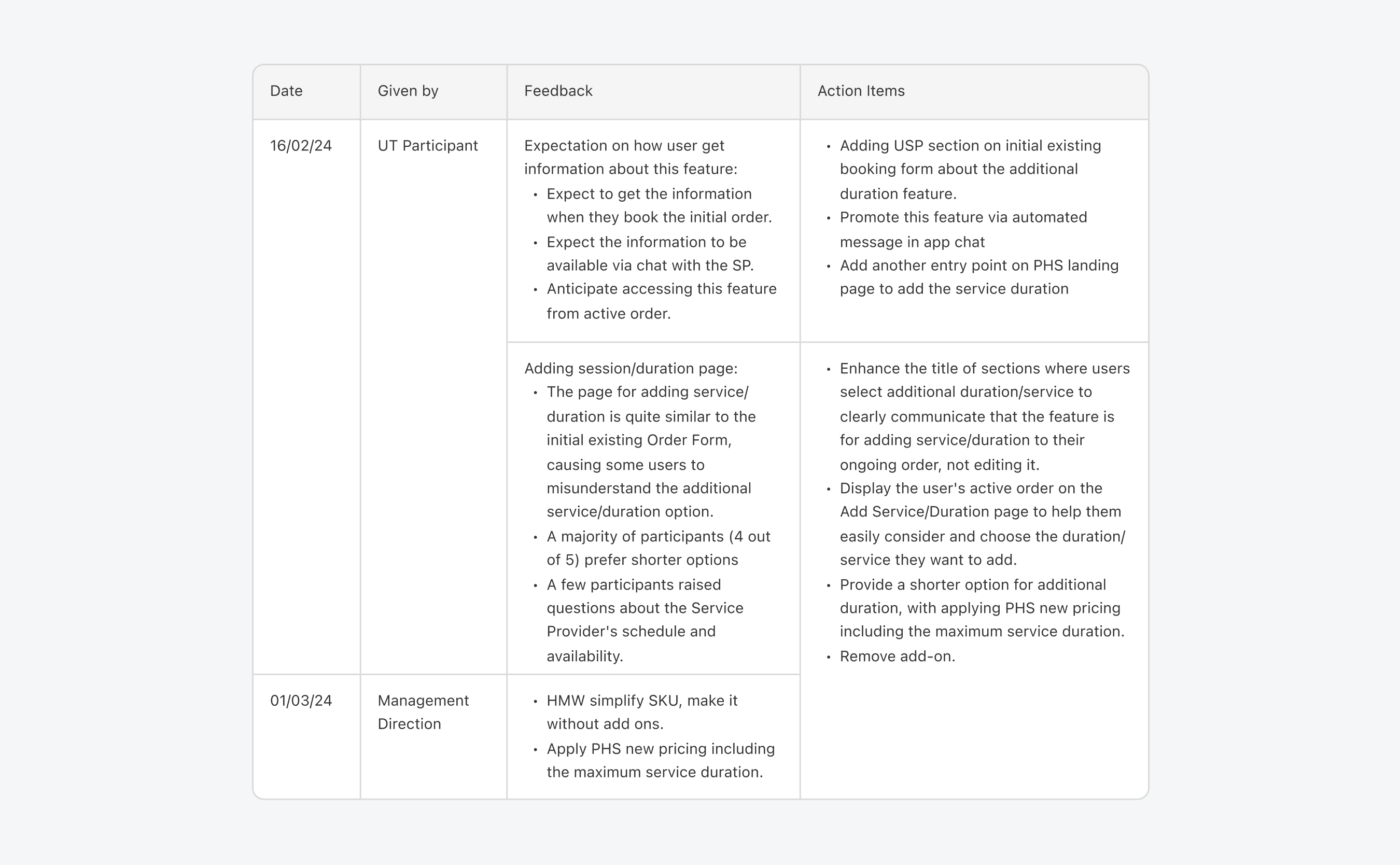
Based on the usability testing findings, we restructured the solution around three core problems: discoverability, flow clarity, and real-time awareness.
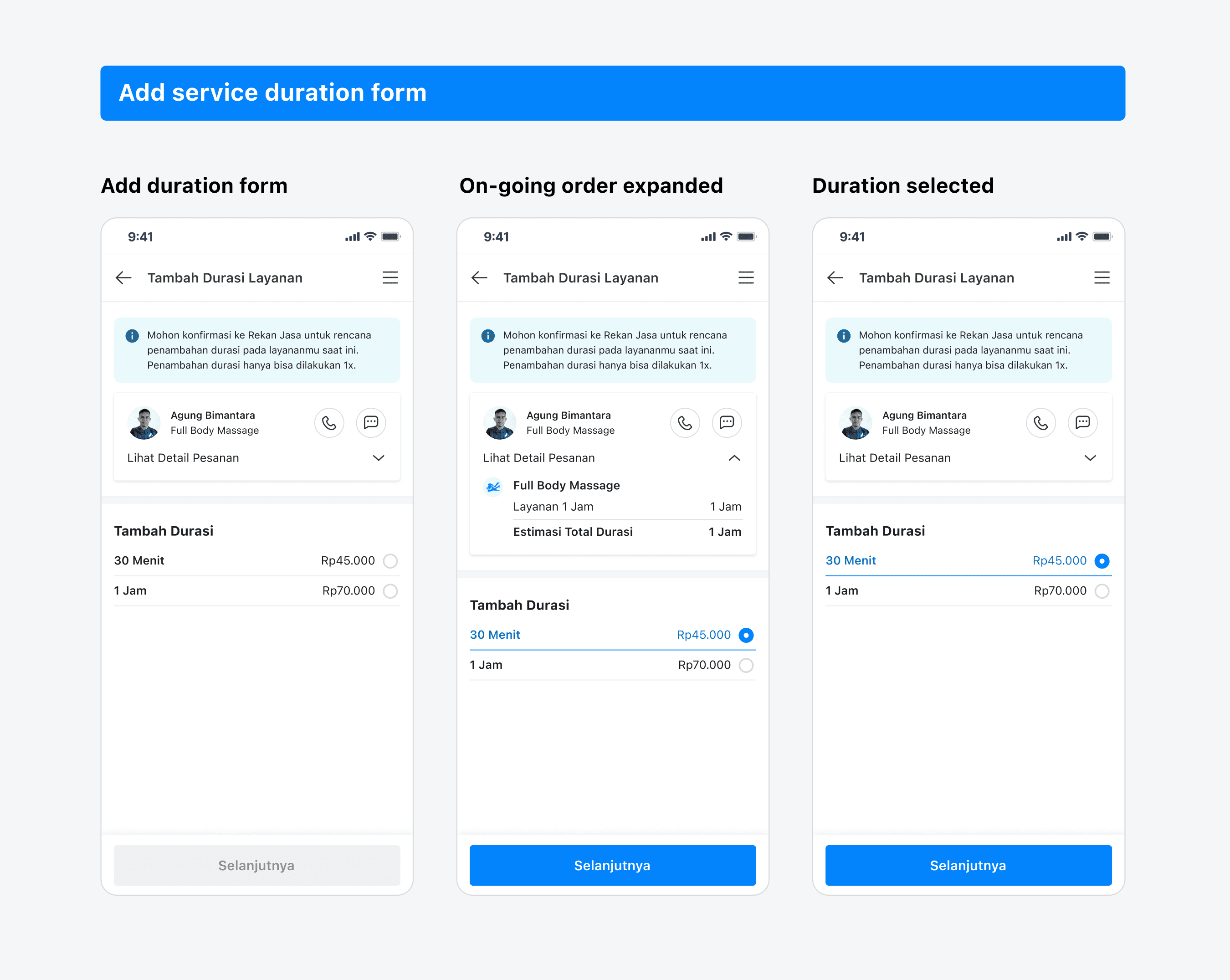
Problem 1: Flow Clarity — The Add Service Duration Form
Goal: Make the extension flow feel distinct from the original booking, while still being intuitive.
What we changed:
- The form now displays the user's active order details (service type, current duration, service partner) at the top, anchoring them in the context of extending rather than creating.
- For both Massage and Home Cleaning, the mechanism is streamlined: users simply select the additional duration — no add-ons, no complexity.
- Available duration options are dynamic, calculated based on the service partner's remaining schedule availability and the service's maximum allowed duration. This prevents users from selecting a time slot that would conflict with the partner's next booking.
- Every service has a defined maximum duration cap, so the form only presents shorter, valid options.
Problem 2: Awareness & Education
Goal: Make users aware they can extend, at the moment it's most relevant.
What we designed:
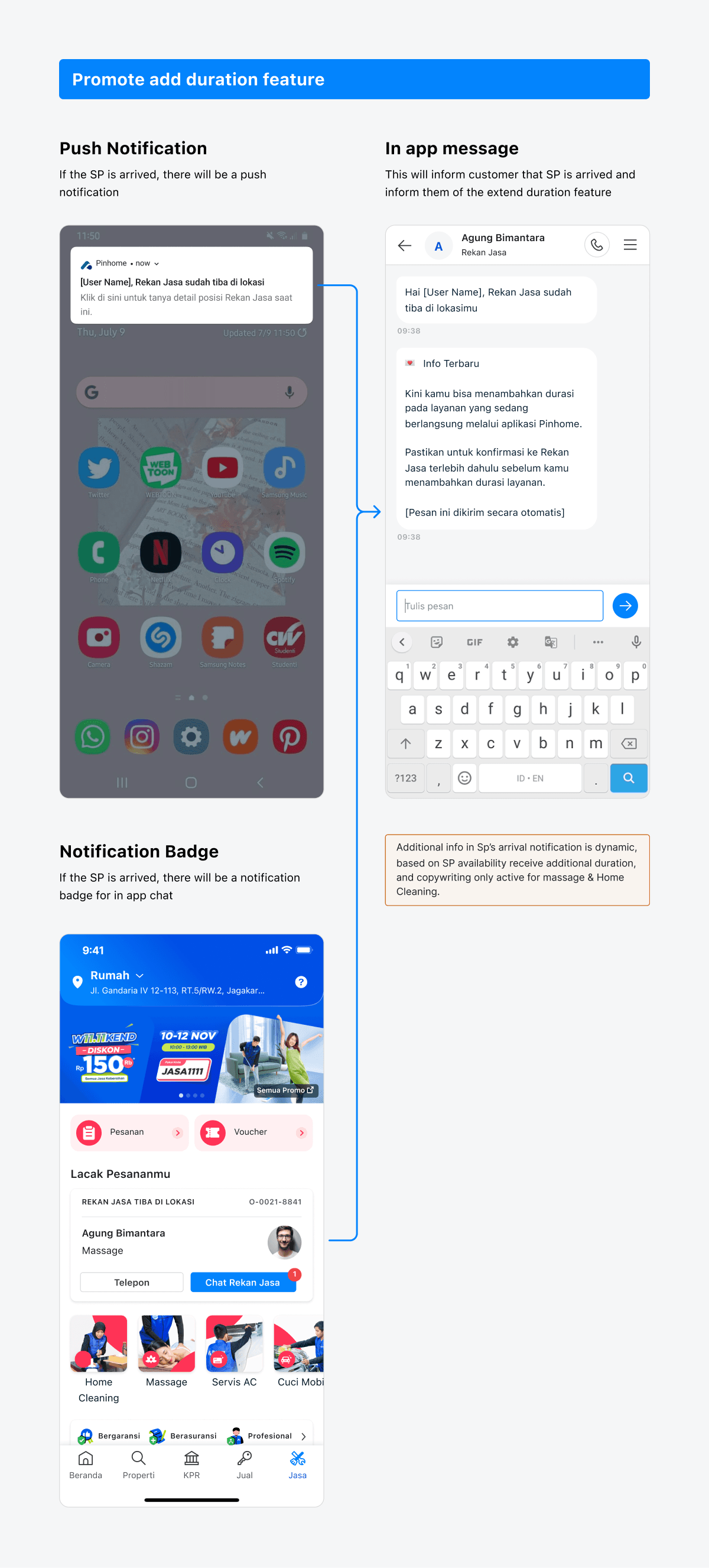
- When the Service Partner arrives and begins the session, the customer receives both a push notification and an in-app chat message introducing the "Add Duration" feature.
- This nudge only triggers if the system validates that the service partner has available time between the current order and their next booking — preventing false promises.
- Applied to Massage and Home Cleaning services.
Enhancing the Booking Experience, Adding USP Visibility:
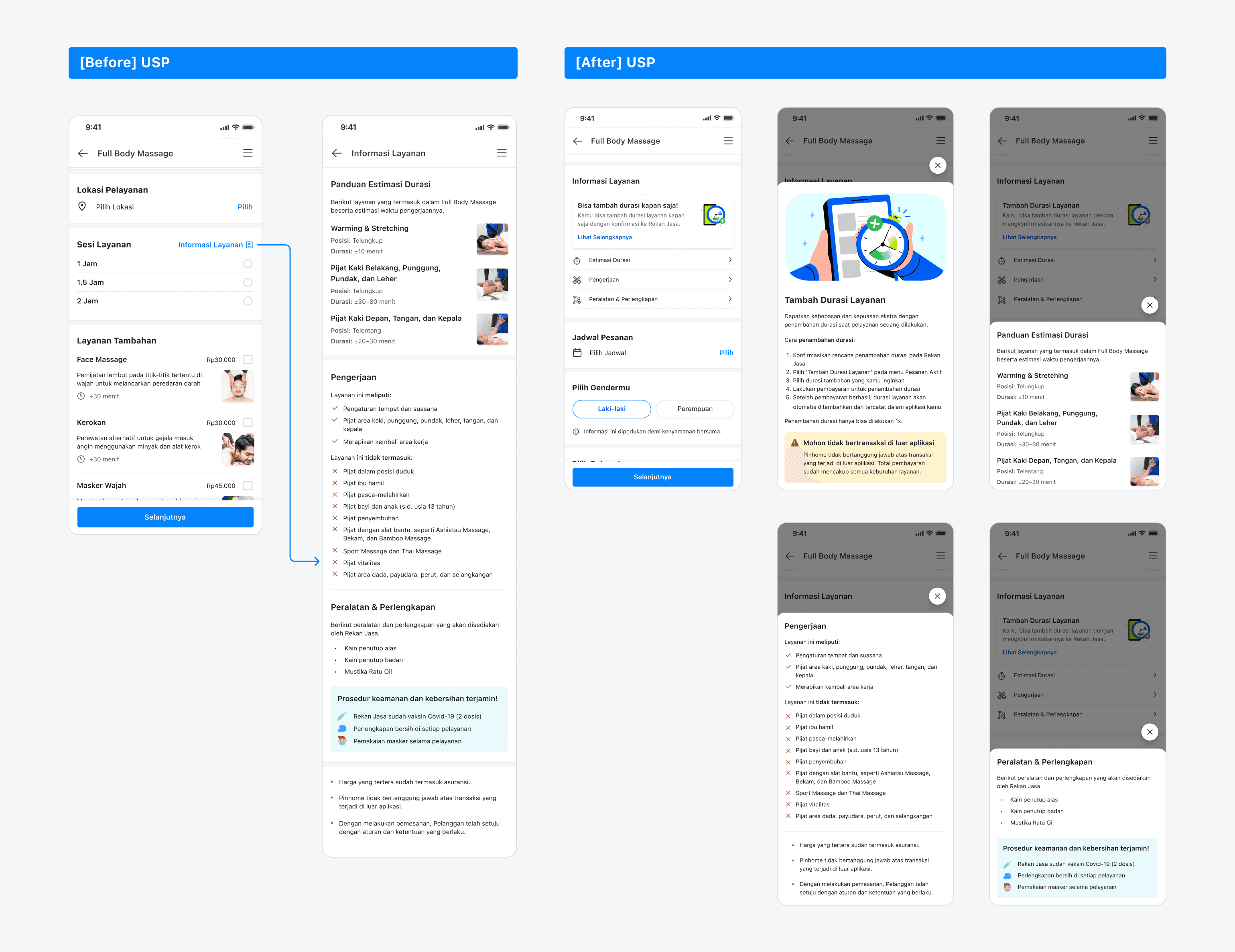
During usability testing, we discovered that users weren't aware they could add service duration because the existing "Service Information" section was consistently overlooked. It contained important details (time estimates, equipment needed, do's & don'ts), but users skipped right past it.
Before: All service information was buried in a single, easy-to-miss section.
After: We broke the information into distinct, scannable categories, added a dedicated banner space to highlight Unique Selling Points (including the "Add Duration" feature), and made detailed information accessible through pop-ups — keeping the main flow clean while ensuring nothing important is hidden.
Real-Time Nudging
- When the Service Provider (SP) arrives, the customer receives:
- A push notification
- An in-app chat message promoting the “Add Duration” feature
- Validation ensures this option is shown only if the SP has available time between the current order and their next booking.
- Applies to Massage and Home Cleaning services.
Problem 3: Discoverability, Expanded Entry Points
Goal: Ensure users can find the feature regardless of where they are in the app during an active service.
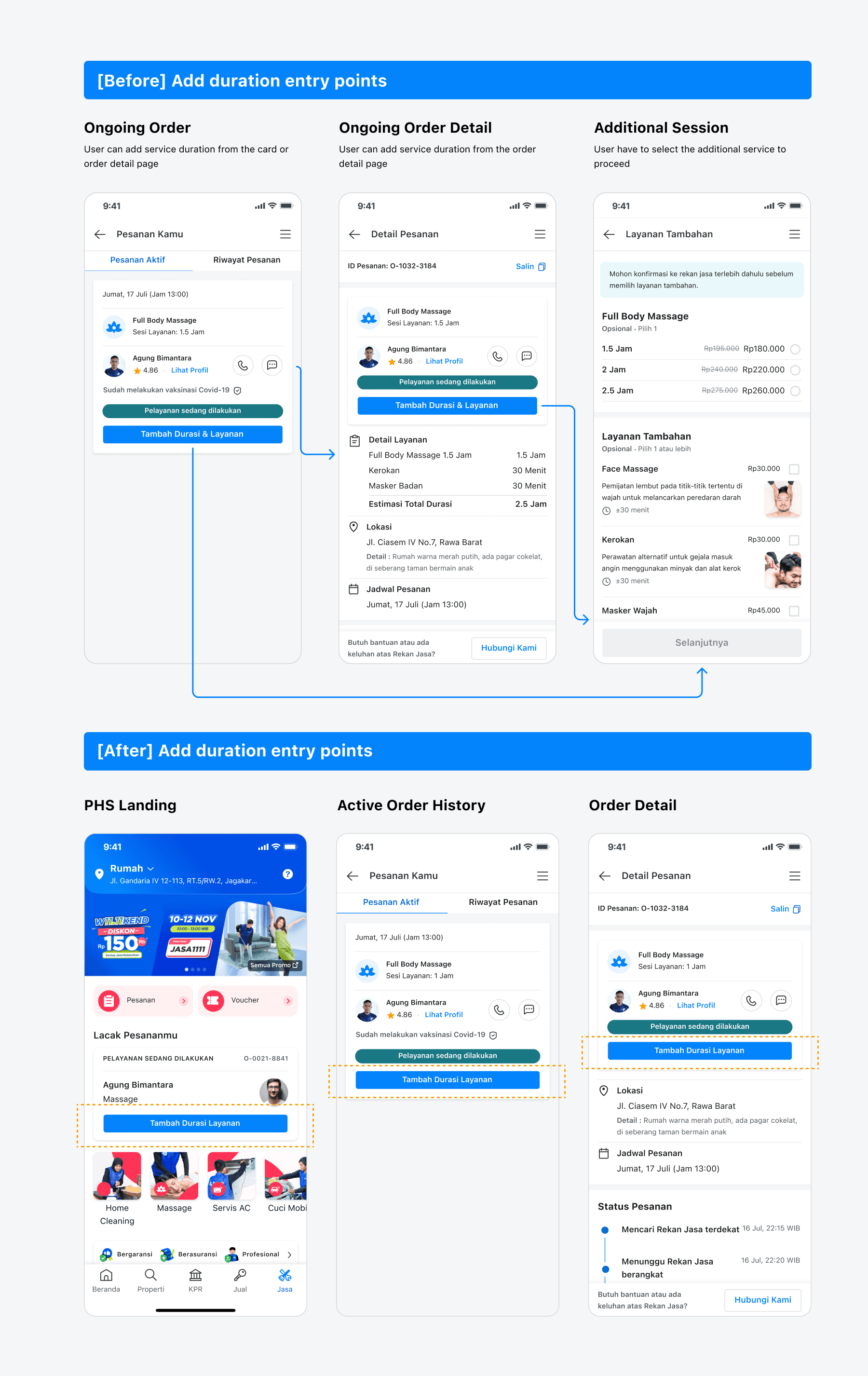
In the first iteration, we provided 2 entry points. Based on testing feedback, we expanded to 3 entry points, all available when the order status is "Service in Progress":
- Landing Page (PHS): A CTA on the ongoing order card visible on the home screen, catching users who haven't navigated deeper.
- Active Order Tab: A CTA on the order card within the orders list, for users checking their order status.
- Order Detail Page: A CTA accessible inside the full order details, for users who've already drilled into their order.
This layered approach ensures that no matter the user's navigation path, the option to extend is always within reach.
Outcome
Impact analysis
- Adoption hit our target organically. Without any marketing push or promotional activity, the feature reached 5% of Total Completed Bookings for Home Cleaning and Massage — meeting our success threshold through pure product-driven discovery.
- Average ticket size: IDR 135K — indicating that users are making meaningful extensions, not just testing the feature.
- Validated scalability. The strong organic adoption confirmed that the quotation-based system works, opening the door for expansion into other service categories: adding units for AC Cleaning, adding furniture items for Deep Cleaning, and more.
Reflection
Concept Testing Sets Direction, But Direction Alone Isn't Enough
Our concept testing successfully validated the user need and helped us commit to a clear product direction early on. But when that direction was translated into an actual interface, it fell short. Users found the layout too similar to existing flows, which created confusion rather than confidence. This reinforced an important principle: validating an idea and validating the interaction are two separate steps, and both are essential.
Familiarity Isn't Always Clarity
It's tempting to lean on existing patterns for the sake of consistency. But in this project, the familiar UI backfired because users expected different behaviors in a different context. We learned that intentional differentiation, even if it means breaking from established patterns, is sometimes necessary to set the right expectations and guide users effectively.
What I'd Do Differently Next Time
If I were to approach a similar project again, I would push for a lightweight interactive prototype even during concept testing, not just static sketches. The gap between what users say about a rough concept and how they behave with a clickable flow is where the most valuable insights live. Catching interaction-level issues earlier would have saved us a full design iteration cycle.